|
-
February 10th, 2005, 03:14 PM
#1
Right Ive tried several things...
I have tried connecting the new drive to my c drive which has windows on it...but generally Im confused about the master/slave thing, as on the back of my harddrives there is no labels for the master and slave settings and Ive tried it a few wasy, but when I disconnect one drive the other dosent work....
wish to God I could just show you dudes my comp for 5 minutes.......
I could take a digital pic!
 Originally Posted by geeksRus
usually there is a label on the top of the CD drive that tells you which pins to put the jumper on...sometimes it is even stamped rite into the metal above the jumper block. MA for Master...SL for Slave, etc. yes, an external enclosure would work, but may be a little slow if your computer duznt have USB 2. did you use the new flat gray cable that should have come with your new drive? be sure that the cable is installed correctly.
-
February 10th, 2005, 09:38 PM
#2
Well Ive given up and Im going to ge the 5.25” USB External Drive Enclosure
Do you think this will definately work?
Originally Posted by mayney
Right Ive tried several things...
I have tried connecting the new drive to my c drive which has windows on it...but generally Im confused about the master/slave thing, as on the back of my harddrives there is no labels for the master and slave settings and Ive tried it a few wasy, but when I disconnect one drive the other dosent work....
wish to God I could just show you dudes my comp for 5 minutes.......
I could take a digital pic!
-
February 13th, 2005, 06:00 AM
#3
Driver Terrier

No, I don't
The key here is you add one, and the other goes.

Here is a photo of the jumpers. Usually on most cd roms, the jumpers are all the same - here is a drawing to make it clearer.

The master drive and slave drive are set by using the jumpers. Set one to master, the other to slave.
Now there are two types of ide cables. One is 80 wire and often has a blue connector for the motherboard end. The other type is 40 wire and is the type needed for cdroms - a 40 wire is pictured below.
Make sure you have the right type of cable.
When you have checked you have everything plugged in right, boot to windows and check in device manager. Are there any ! on any devices?
If not, get a few different types of cd and see if any of them read - post which work and which don't.
Last edited by NooNoo; February 13th, 2005 at 06:02 AM.
Never, ever approach a computer saying or even thinking "I will just do this quickly."
-
February 17th, 2005, 02:04 AM
#4
Hi mate, thanks for helping me, I shall try this tonight, and get back to you pronto...Ill document everything I do or witness...!
I cant see your pictures though, would you mind emailing them?
[email protected]
I really just want this thing fixed, my work is at a standstill....
Thanks,
Colin
Originally Posted by NooNoo
No, I don't
The key here is you add one, and the other goes.

Here is a photo of the jumpers. Usually on most cd roms, the jumpers are all the same - here is a drawing to make it clearer.

The master drive and slave drive are set by using the jumpers. Set one to master, the other to slave.
Now there are two types of ide cables. One is 80 wire and often has a blue connector for the motherboard end. The other type is 40 wire and is the type needed for cdroms - a 40 wire is pictured below.
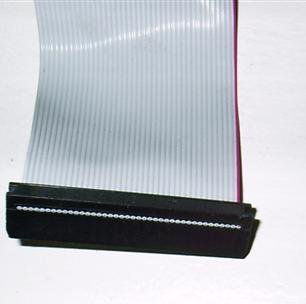
Make sure you have the right type of cable.
When you have checked you have everything plugged in right, boot to windows and check in device manager. Are there any ! on any devices?
If not, get a few different types of cd and see if any of them read - post which work and which don't.
-
February 17th, 2005, 02:04 AM
#5
[Thats wierd, as soon as I post i can see them...ok forget the emailing of the pictures! I think the strange thing about all this is, I leave my computer, dont touch it, I come back the next day, andall of a sudden it wont recognize disks....
now as you know I bought the new drive, do you think there is any chance that the first cd rom malfunctioned, and it just so happens I bought a second malfunctioning one? (it was 2nd hand)
Last edited by mayney; February 17th, 2005 at 02:07 AM.
-
February 20th, 2005, 02:26 AM
#6
Driver Terrier
err yes, even if you bought it new, the chances of getting a bad drive out of the box are better than winning the lottery!
But did you change the ide cable? Often a dicky cable can cause all kinds of mayhem.
Similar Threads
-
By sherqa in forum CD-ROM/CDR(-W)/DVD Drivers
Replies: 1
Last Post: February 13th, 2005, 05:34 AM
-
By tecboy in forum Tech-To-Tech
Replies: 2
Last Post: July 27th, 2003, 07:37 PM
-
By Richie Rich in forum CD-ROM/CDR(-W)/DVD Drivers
Replies: 1
Last Post: November 25th, 2001, 06:11 AM
-
By Danrak in forum Tech Lounge & Tales
Replies: 5
Last Post: January 30th, 2001, 04:51 AM
-
By Vic in forum CD-ROM/CDR(-W)/DVD Drivers
Replies: 1
Last Post: May 31st, 1999, 05:26 AM
 Posting Permissions
- You may not post new threads
- You may not post replies
- You may not post attachments
- You may not edit your posts
-
Forum Rules
|
|



 Reply With Quote


Bookmarks