|
-
July 27th, 2008, 11:59 AM
#1
 XP Pro crashilng and restarting XP Pro crashilng and restarting
I have an Asus p5p800se XPpro SP2 Pentium D2
It started to crash and restart.
It goes to a black screen and then restarts.
It works for a while then crahes again.
I tried going to a clean boot, uninstalled CA antivirus ans spyware, plugged it into the non battery backup plugs on the UPC.
The PSU was replaced about six months ago.
All the temperatures and fan speeds on Asus probe seem ok.
Any ideas on where to start to look for the cause.
Last edited by travistee; July 27th, 2008 at 12:04 PM.
-
July 27th, 2008, 02:06 PM
#2
Registered User

Firstly I wouldn't trust any asus application to tell me about heat. Try a few others like Speedfan and maybe mbm5 but i think it may not recognize that chipset.
Secondly what video card ?
Cause that could be a video card overheat problem as well.
How long after the original install of windows before it started crashing?
How long after you first power up the computer before it starts crashing?
-
July 27th, 2008, 03:26 PM
#3
It has an asus 9200 or 9500 ATI type video card.
Windows has been installed for about two years.
The motherboard temp is 37 C
The CPU temp is 57C when idle and 61 C under load
I turned off the auto restart in mycomputer/properties
It doesn't go to a blue screen just black then restarts anyway.
It seems to do ok if I just let it sit without doing anything.
About 2 or 3 hours siting idle with no problems.
If I try to run a spyware scan or something that keeps it going for a while
it crashes.
After 5 minutes the temp goes up to 64.
Then it crashed at 30 minutes into the spyware scan.
Last edited by travistee; July 27th, 2008 at 03:28 PM.
-
July 27th, 2008, 05:49 PM
#4
Registered User
Well i doubt its the cpu temp. I would be m,ore inclined to see if ytou can see what the video card temp is. At least feel "close" to the video card main chip and see if you can feel alot of heat.
-
July 28th, 2008, 10:00 AM
#5
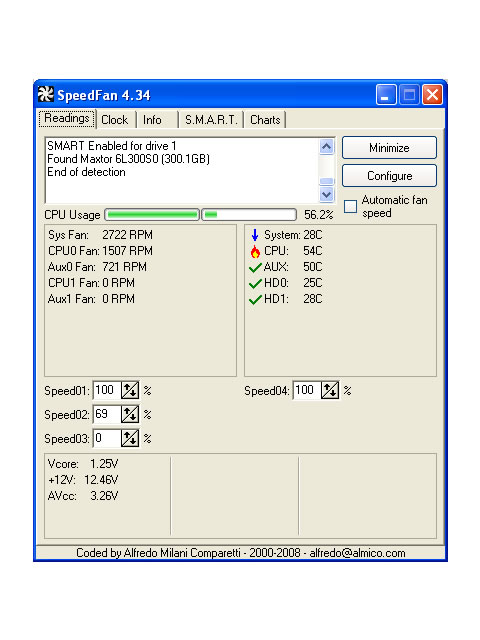
I didn't check the video card yet, but I'm going to try to
vacuum the box and see if that helps.
What do you think of the temps in the speedfan pic?
-
July 28th, 2008, 10:12 AM
#6
Registered User
I see nothing wrong with the temps there. Your cpu is full able to handle those temperatures and a lot more
-
July 28th, 2008, 10:23 AM
#7
I started it with the box open.
I didn't see and dust to clean out.
The video card heat sink feels warm but not really hot.
-
July 28th, 2008, 10:41 AM
#8
I talked to Asus tech support.
They tell me that the CPU temp is too hot and should be in
the 30-40 C range.
My cpu fan speed is 1500 and they say it should be 3000.
Sounds like I need a new fan?
Any recommendations for a Fan for a Pentium 820 (D2)
Last edited by travistee; July 28th, 2008 at 11:01 AM.
-
July 28th, 2008, 10:40 PM
#9
Registered User

travistee, the temperature reporting for this CPU with any software isn't likely to be 100% accurate, but here's a decent guide to operating temperature ranges. Your CPU is about 3/4 down the page.
So, yes, I think your fan is likely dying, and the CPU may be hot, so a new HSF wouldn't be a bad idea, but oftentimes the temperature reported by the software is higher than the actual temperature. I don't really have a specific suggestion for a brand here; any decent LGA 775 cooler should work. Scythe and Thermaltake are decent brands, but everyone has a favorite brand. Just check the clearances on your board and case, because some of the behemoths are often hard to fit in.
-
August 2nd, 2008, 12:58 PM
#10
I installed a Zalmon 9300 HSF.
I checked the temps in bios and with fanspeed.
They are about the same.
Now with the system idle the system temp is 36 C and the CPU temp is
53 C. That was with the case open. With the case closed the CPU temp is about 57 just like with the old Intel HSF.
Under load the CPU temp goes up to 59 and the system still crashes and restarts.
Does a Pentium D 820 shut down at 63 C?
The CPU fan speed with the Zalmon was around 2100.
My bios was set to AUTO for fan speed and I reset it to 90%.
That got the fan speed up to 2400 but the temp did not go down.
I also found that I had a CPU target temp that was set at 65C and I reset that to 51C ( as low as it goes). Changing the target temp alone didn't do anything.
Is it possible that the MB is not making the fan go fast enough.
It looks like the new fan and the old one have about the same temp results.
I'm thinking about trying Arctic Silver 5 grease.
Do you think that will help.
I may have had too much grease last time, but I only used a small amount and spread it evenly this time with the new HSF.
Last edited by travistee; August 2nd, 2008 at 01:03 PM.
-
August 5th, 2008, 08:29 AM
#11
Asus is going to check out the MB under warranty.
Let you know if that was it.
-
August 29th, 2008, 05:26 PM
#12
Yep, it was the motherboard, so they are giving me a new one,
since they dont make that one anymore.
 Posting Permissions
- You may not post new threads
- You may not post replies
- You may not post attachments
- You may not edit your posts
-
Forum Rules
|
|



 Reply With Quote


Bookmarks