|
-
November 28th, 2005, 08:15 PM
#1
cd-rom issues...
hello everyone!
i just happen to have a problem with my cd-rw drive... it was working fine until a couple of days ago, but then it would refuse to read any CD i would put in, showing it as blank. i thought maybe the drive itself might be busted (since its almost 4 yrs old), so i bought a new one... same problem. i checked in the device manager and it says the device works properly. now i have tried to boot the comp from a cd, like explained in the sticky post, and success! it worked... but it still sees every cd as blank when loaded in windows.
the cd-rw drive is a benq cd-rw 5232x. os is win xp.
any help will be greatly appreciated, thank you in advance.
-
November 29th, 2005, 05:35 AM
#2
Geezer

Hi zed welcome to wd forums.
Can you go back to that sticky & try the 'filter load order tool' ?
Post me/us up the results & we'll see if that gives any clues 
-
November 29th, 2005, 03:17 PM
#3
hello again
i am not sure i understand everything about the filter load order tool... sorry, im kind of a newbie at this...
what i can say is i managed to make it work, but the rough way. everytime i want to load a cd, regardless of the contents, i have to go to device manager, open the cd-rom drive, go to volume and make it "populate". so yes it works, but it can get a bit tricky if anything installed exceeds 1 cd. maybe i am missing some "auto-play" option in there?
thx for the help =)
-
November 30th, 2005, 04:34 AM
#4
Geezer
Mmmm .. well as they say you live & learn ..
..go to volume and make it "populate". so yes it works..
At least so far we can conclude that the unit is 'well' as far as reading & cabling go .. but that's an entirely new level of 'partial workingness' that I've not come accross before, however some googling seems to indicate that's a problem with what you are finding a problem - these here filter drivers I was waffling about ..
To use the filter driver load order tool, you download devfilter.exe to somewhere you can find it, then double click it to make it run. Then Just use the up & down keys or select one of the drives shown in the left hand pane with your mouse - we want a note of the info for upper & lower filters shown in the top right box, (this is the bit folks usually get stuck with, as they don't realise what I/we want) like so :-
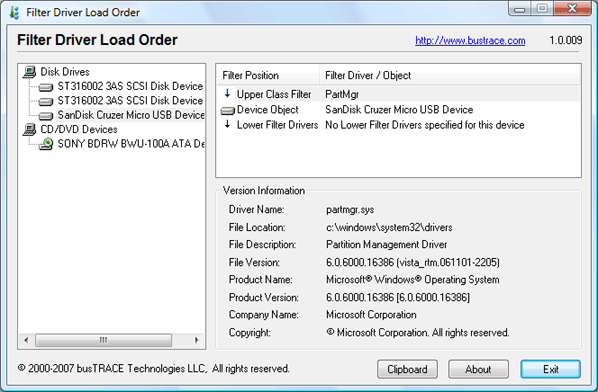
(so I'd either want a screenshot with that info, or for you to type out - upper class filter=pwd_2k etc)
-
December 1st, 2005, 06:01 PM
#5
alrighty, i downloaded that program and here is what it gives out...
upper class filter: GEARAspiWDM
upper devie filter: redbook
device object: BENQ CDRW 5232X
lower class filter: Cdr4_xp
lower class filter: PxHelp20
lower device filter: imapi
i hope this is the info you are looking for =)
Similar Threads
-
By Richie Rich in forum CD-ROM/CDR(-W)/DVD Drivers
Replies: 1
Last Post: November 25th, 2001, 06:11 AM
-
By goldbrick in forum CD-ROM/CDR(-W)/DVD Drivers
Replies: 3
Last Post: May 18th, 2001, 01:44 AM
-
By willieray in forum CD-ROM/CDR(-W)/DVD Drivers
Replies: 4
Last Post: January 25th, 2001, 10:00 AM
-
By Billsloan in forum CD-ROM/CDR(-W)/DVD Drivers
Replies: 0
Last Post: October 5th, 2000, 10:07 PM
-
By lhanna in forum CD-ROM/CDR(-W)/DVD Drivers
Replies: 3
Last Post: September 21st, 2000, 11:32 AM
 Posting Permissions
- You may not post new threads
- You may not post replies
- You may not post attachments
- You may not edit your posts
-
Forum Rules
|
|



 Reply With Quote


Bookmarks