|
-
February 27th, 2004, 09:11 AM
#1
Wireless problem - Question
I am trying to link a Windows XP PRO machine and a Windows 98SE machine using two Netgear MA111 USB adapters. The machines are some way apart (five floors approx) up a long set of stairs with metal banasters.
I have set the dongles up so they can nearly see each other directly )line of site) though.
The Netgear Utility indicates only a 19% signal on both machines.
Before I ask for real help is the signal strong enough to share an internet connection?
Both adaptors are set up in Ad-Hoc mode with the same SSID.
-
February 27th, 2004, 09:22 AM
#2
Registered User

As long as the signal strength is constant. However if a cat walks by you might lose your connection for few seconds.
-
February 27th, 2004, 09:31 AM
#3
Well, there is no cat in the house but people obviously walk up and down the stairs!
Can I assume that 19% is OK?
-
February 27th, 2004, 09:35 AM
#4
Registered User
 Originally Posted by ozrica
Well, there is no cat in the house but people obviously walk up and down the stairs!
Can I assume that 19% is OK?
You can assume. Only trying will give you the right answer. There are cases in which with a 50% signal people still lose connection sometimes, but here in the office a laptop tested OK for hours with some 5%.
-
February 27th, 2004, 09:37 AM
#5
Geezer

-
February 27th, 2004, 09:46 AM
#6
OK. I will ask for a bit of help then because I am unable to share an internet connection.
The XP PRO machine has an NTL broadband modem connected to an internal Netgear 10/100 NIC which works fine.
Both MA111's installed fine on each machine.
The Netgear utility pop's up on each machine with a green light and all seems fine.
I ran the network setup on the XP machine and created the floppy disk. Installed it on the 98SE machine with no problem.
Still no Internet connection on the 98SE machine.
I have removed the firewall on the XP machine and have made sure that the XP firewall is turned off (which it was anyway).
A couple of odd things that occured after running the network setup disk were:
The Netgear MA111 USB decive reporting with a yellow exclamation mark in 'Device Manager' but came back fine after another reboot.
If I try to assign an IP address (192.168.1.2) on the 98SE machine the Netgear shows a yellow exclamation mark again but STILL shows it after a reboot!
The 98SE machine uses an ECS K7S6A motherboard with a SIS chipset but after lots of google searching I cannot find any compatability problems.
I am not at the machines at the moment but some direction of things to try would be useful.
Thanks
-
February 28th, 2004, 04:06 AM
#7
Geezer
Confus-ed again ! 
You are gonna have to explain to me how these 'worked' to give you 19% signal strength reading - when apparently at least one nic is showing as 'bad/not correctly found' ... & are we still trying this like 50 ft away? if we are - try close up first ...
-
March 2nd, 2004, 12:57 PM
#8
Sorry for the delay..........
I can't get the machines closer as they are both bulky desktop machines.
When I clean install the device on the W98SE machine it all works fine. The Netgear software reports a 19% signal strength. If I move the dongle and re-scan it changes between 17% and 32%.
If I change the network properties under W98SE. For example assigning a fixed IP of 192.168.1.2 (SNM 255.255.255.0) the PC will restart and the device will show a yellow exclamation mark - saying not all the drivers are installed etc. If I remove the IP it goes back to working as above!
I have installed the latest drivers and software from the Netgear site.
-
March 2nd, 2004, 01:41 PM
#9
Geezer
Originally Posted by ozrica
..If I change the network properties under W98SE. For example assigning a fixed IP of 192.168.1.2 (SNM 255.255.255.0) the PC will restart and the device will show a yellow exclamation mark - saying not all the drivers are installed etc. If I remove the IP it goes back to working as above!..
Just to make absolutely sure, since I'm perplex-ed never mind confus-ed (which is 'worse' -  ) , by all these symptoms, ALL that you are doing is finding this :- ) , by all these symptoms, ALL that you are doing is finding this :-
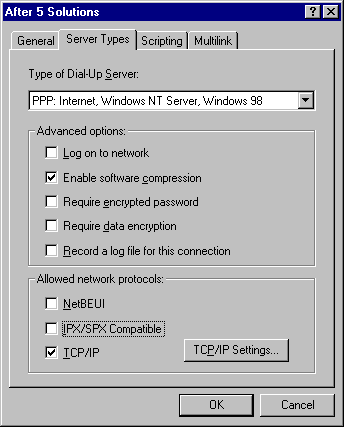
& then this one ..
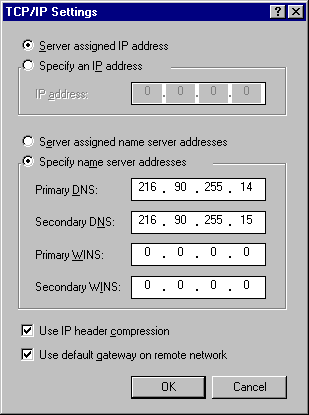
& then choosing between 'server assigned' or 'specify' - nothing else at all ?
& that makes the NIC go 'bad' ? (well show up with a yellow '!') - you say 'the PC will restart' - what ? Straight away ? (it goes 'splat' or what?) or you mean after next boot it does that ?
-
March 3rd, 2004, 03:36 AM
#10
confus-ed......That is all I am doing. If changes are made the system must be restarted. It's not going 'splat' or anything!
If I remove the IP after the system has re-booted the Netgear goes back to being happy!!!!!!!!!!!!!!!!
Should I just give up?
-
March 3rd, 2004, 05:04 AM
#11
Geezer
Originally Posted by ozrica
confus-ed......That is all I am doing. If changes are made the system must be restarted. It's not going 'splat' or anything!
If I remove the IP after the system has re-booted the Netgear goes back to being happy!!!!!!!!!!!!!!!!
Should I just give up?
Well personally I'd call that defeatist ! 
Yup sure it ought to ask you to restart, I just wondered if it went splat ! & that was the reason why the yellow '!' appears - & that's why it won't work/makes yellow ! (which is pretty obvious) .. but why the hell changing what ip it gets can result in this I dunno for sure (& I'm not too sure about 'at all' ... )
You might try unistalling/reinstalling DUN (dialup networking -I know its broadband & you don't dial but it re-does tcp/ip & winsock too) from 98, & there's a new version of it that maybe might help too ...Dial-Up Networking 1.4 Upgrade
-
March 3rd, 2004, 08:04 AM
#12
Thanks. I have removed dial-up networking and re-installed but I will try the new version.
It must be something to do with the SIS chipset on the motherboard!
I am going to try a different product aswell to see what happens.
Thanks again.
Similar Threads
-
By Fierce in forum Tech-To-Tech
Replies: 8
Last Post: May 26th, 2004, 12:22 PM
-
By ScooterWad in forum Networking
Replies: 6
Last Post: February 14th, 2003, 07:04 PM
-
By Ryno in forum Windows 95/98/98SE/ME
Replies: 8
Last Post: August 4th, 2001, 03:02 PM
-
By Nailz in forum Tech Tips
Replies: 0
Last Post: June 18th, 2001, 07:17 AM
-
By RAVE in forum Tech-To-Tech
Replies: 27
Last Post: October 27th, 1999, 10:16 PM
 Posting Permissions
- You may not post new threads
- You may not post replies
- You may not post attachments
- You may not edit your posts
-
Forum Rules
|
|



 Reply With Quote


 ... how 'nearly' is nearly ? can it be nearer 'nearly' than it is ?
Bookmarks