|
-
March 22nd, 2004, 04:35 AM
#1
Best way to setup adsl on a simple lan?
I have a friend who currently has 3 desktop computers and a laptop setup in a simple lan. He has just recently purchased adsl and wants to set it all up so all computers can access the adsl connection. What would be the best way to do this?
He was thinking about buying the Netcomm1300B 4 port adsl modem router but will this modem only share the adsl connection out to the 4 computers or will it also share data between each computer also???
(I have never done this before except on my own 2 computer LAN and I used ICS.)
OR....
Would we be better off buying a seperate router/hub (Whats the difference??) and connecting all network computers on one side and the adsl modem on the other??? Is that basically how it works??
If so what type of router brand name etc should we get. If someone could point us to a good website that explains all of this that would be great.
Thanks.
-
March 22nd, 2004, 04:53 AM
#2
Just to add. He gave me a plan of how it was setup when he had his office back over east.
Would this be the best way to set this up? Does he really need the router and the switch or could he get by with just the router?
Also I noticed that he has one computer setup as the server but Im assuming that in this setup this computer is only called a server in terms of being their main computer that they back up too, and is not actually a server by way of connection setup. (If that make sense)
Here is the plan.

Last edited by riddellcomp; March 22nd, 2004 at 07:22 AM.
-
March 22nd, 2004, 05:57 AM
#3
Geezer

-
March 22nd, 2004, 08:36 AM
#4
Sorry about the pic. Ive reduced it a bit but didnt want to reduce it too much or you wont be able to see it.
Thanks for the link I will have a read.
-
March 22nd, 2004, 08:53 AM
#5
Geezer
 Originally Posted by riddellcomp
Sorry about the pic. Ive reduced it a bit but didnt want to reduce it too much or you wont be able to see it.
Thanks for the link I will have a read.
Yeah that's why I said a 'littler one' & a link to your 'big one'  .. but your 'plan' thus far, looks on track .. but your 'plan' thus far, looks on track 
If you've only got 3 machines then you'll only need the bit up to & including the 4 port adsl router you propose (and 3 machines 'hanging' off that) & not the hub hanging off the router anyways ..
You also asked about peer to peer networks (you didn't 'exactly' but its what you are getting at I think) vs client server networks .. yup the first doesn't really have a 'server' each machine 'serves' each other for file shares & the router splits/shares your outside connection ..
Last edited by confus-ed; March 22nd, 2004 at 08:56 AM.
-
March 22nd, 2004, 09:18 AM
#6
Originally Posted by confus-ed
If you've only got 3 machines then you'll only need the bit up to & including the 4 port adsl router you propose (and 3 machines 'hanging' off that) & not the hub hanging off the router anyways ..
You also asked about peer to peer networks (you didn't 'exactly' but its what you are getting at I think) vs client server networks .. yup the first doesn't really have a 'server' each machine 'serves' each other for file shares & the router splits/shares your outside connection ..
No its actually three machines and three laptops (exactly as in the diagram) so I assume I will need the switch also?
And thanks for clarifying the peer to peer setup question. He kept telling me about the server but I think its just what they called the main computer, and not that it was a server as such.
-
March 22nd, 2004, 09:38 AM
#7
Geezer
Originally Posted by riddellcomp
No its actually three machines and three laptops (exactly as in the diagram) so I assume I will need the switch also?
And thanks for clarifying the peer to peer setup question..
You are welcome My physic Tech Aura came on-line for that bit  (its a bit tempramental lately - other things to worry about ..) (its a bit tempramental lately - other things to worry about ..)
But yes you'll need another switching device (a hubs fine in this network inside our 'router protected' zone) or look for one with enough ports ... since I now know we have laptops too - what about wireless lan ? Is this in our 'scheme' or did you consider it ? (just to complicate matters ..  ) - if you only do 'occasional' file shares & are principally concerned with sharing your internet connection - this works out real good ... most especially since class g wireless networks (54 m/bits link is plenty to share, to just service any internet connection at home, and not so bad for file sharing within it, if you only do a 'bit') have got so cheap all of a sudden ... ) - if you only do 'occasional' file shares & are principally concerned with sharing your internet connection - this works out real good ... most especially since class g wireless networks (54 m/bits link is plenty to share, to just service any internet connection at home, and not so bad for file sharing within it, if you only do a 'bit') have got so cheap all of a sudden ...
-
March 22nd, 2004, 11:02 AM
#8
-
March 22nd, 2004, 08:24 PM
#9
The only adsl modem we could get in town is a Billion 4 port router.
Could we use this in place of the current router and still use the switch as in the diagram??
-
March 23rd, 2004, 03:33 AM
#10
Okay well we managed to get it working sort of.
All three computers can access the internet via the adsl connection. However only some of the computers can access some of the other computers within the network.
Here is a run down The computers are called (SERVER)-XP Pro, (KLARI)-Winme and (BOB)-Winme
SERVER cannot access BOB
SERVER can access KLARI
KLARI can access SERVER and BOB
BOB can access KLARI
BOB can't access SERVER
So basically KLARI can access all machines. But BOB cant access SERVER and SERVER cant access BOB. I know the cable is good becuase we have internet access from all machines. Any ideas???
Here is a diagram of how its setup. It was setup the same as in the diagram above except we took out the router and used the Billion router instead. Also we swapped BOB and SERVER around so the SERVER machine was in the main office. We dont want to simply hook everything up to the router and do away with the switch for two reasons. Firstly because it was previously setup this way it was easier to do it the same way and secondly we ned the extra ports for laptops.
Thanks for the help, we really ned to get this happening.

-
March 23rd, 2004, 08:53 AM
#11
Pleeaaaaassssse......Someone...................... ...anyone
-
March 23rd, 2004, 09:03 AM
#12
Registered User

Here is a run down The computers are called (SERVER)-XP Pro, (KLARI)-Winme and (BOB)-Winme
SERVER cannot access BOB
SERVER can access KLARI
KLARI can access SERVER and BOB
BOB can access KLARI
BOB can't access SERVER
Ok. Sounds like Bob needs to be setup as a user in Server. Create a new user with the same logon name and password that is used to log on to the machine, on the Server. To test this beforehand, just start the guest user on the server and see if Bob can then access the server. If it works, then create the new user as above. Make sure to disable the guest account when you're through...
-
March 23rd, 2004, 09:28 AM
#13
Originally Posted by MobilePCPhysician
Ok. Sounds like Bob needs to be setup as a user in Server. Create a new user with the same logon name and password that is used to log on to the machine, on the Server. To test this beforehand, just start the guest user on the server and see if Bob can then access the server. If it works, then create the new user as above. Make sure to disable the guest account when you're through...
Its a peer to peer network. SERVER is only called this and isnt actually a server as such. would your above procedure still apply?? If so when you say "Create a new user with the same logon name and password that is used to log on to the machine, on the Server." Do you mean to do this on BOB or on the SERVER?? Also how would I do this? I know how to create user accounts on an XP machine but I thought they were just that "User accounts" on that particular machine and had nothing to do with a network?
-
March 23rd, 2004, 09:38 AM
#14
Geezer
Originally Posted by riddellcomp
Its a peer to peer network. SERVER is only called this and isnt actually a server as such. would your above procedure still apply?? If so when you say "Create a new user with the same logon name and password that is used to log on to the machine, on the Server." Do you mean to do this on BOB or on the SERVER?? Also how would I do this? I know how to create user accounts on an XP machine but I thought they were just that "User accounts" on that particular machine and had nothing to do with a network?
Yes . ( you need an account for the incoming connection)
You pick-ed the 'daft' names
& user accounts in xp have everything to do with permissions - which is what this is all about
& a 'useful link' (which if you read it all I think will un-confuse you
-
March 23rd, 2004, 10:14 AM
#15
Thanks for the replys. I printed out the instructions on the link you gave me confus-ed and it makes more sense now. BOB is already setup as a user on SERVER however it may be setup wrong so I will do it again.
Thanks again.
Similar Threads
-
By riddellcomp in forum Tech Lounge & Tales
Replies: 3
Last Post: February 2nd, 2004, 07:17 AM
-
By RoadkillNZ in forum Internet and Networking
Replies: 5
Last Post: January 3rd, 2003, 10:06 PM
-
By Spawn_X in forum Networking
Replies: 7
Last Post: May 10th, 2001, 08:57 PM
 Posting Permissions
- You may not post new threads
- You may not post replies
- You may not post attachments
- You may not edit your posts
-
Forum Rules
|
|



 Reply With Quote


 ... puts it on 'must do later' pile ..)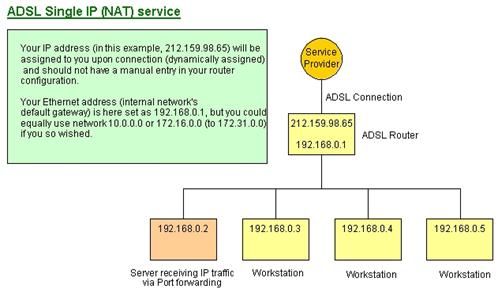

Bookmarks