|
-
April 9th, 2004, 11:56 AM
#16
 Originally Posted by met_man
It worked! Thank you Thank you Thank you Thank you! I will go and get a new case. BTW, what would have caused that? Thanks soo much, Win Drivers rocks! Whooooo HOooooooo!
a big brass stand off screw shorting out your motherboard ,,,,,,,,,,,maybe?
freddy
-
April 9th, 2004, 12:29 PM
#17
Driver Terrier

A new case is not necessary - probably!!
Now the most common problem is that the case stand offs 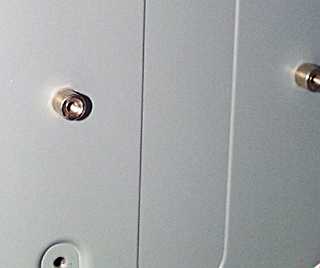 are in the wrong place - You must only put a standoff where a screw hole is on the motherboard. You must also use the correct screws. are in the wrong place - You must only put a standoff where a screw hole is on the motherboard. You must also use the correct screws.
-
April 9th, 2004, 12:59 PM
#18
I had a customer demand a new case because the computer wouldn't start up when the MoBo was in the case. He also complained that the case was defective and he had to bend the PCI cards to make them fit in the case.
Turns out he was screwing the MoBo directly to the case without the stand offs. Once I pointed out what he was doing, be got mad that I didn't tell him ahead of time that he had to use them.
-
April 9th, 2004, 02:14 PM
#19
The risers are all in the right places. The case came with 3 types of screws, but two types have enough screws, and one of those are big and bulky, so I think I am using the right screws. It also came with little gasgets, I put those on the screws going into the board, I tried to put them on the risers but they just keep falling off.
-
April 9th, 2004, 02:28 PM
#20
Originally Posted by met_man
The risers are all in the right places. The case came with 3 types of screws, but two types have enough screws, and one of those are big and bulky, so I think I am using the right screws. It also came with little gasgets, I put those on the screws going into the board, I tried to put them on the risers but they just keep falling off.
my brain is hurtinm,
take it to a repair shop....
-
April 9th, 2004, 04:35 PM
#21
It works! I got a few of the gasgets under the motherboard, also I saw that the cover for an empty PCI slot was rubbing the board. I took it out. I am formatting as we speak. Thanks everybody who helped I appreciate it so much! Now I don't have to  ...lol ...lol
-
April 9th, 2004, 04:46 PM
#22
Driver Terrier
-
April 10th, 2004, 01:06 PM
#23
Registered User

I know this is done but I just had a quick question:
Originally Posted by MobilePCPhysician
Remove the mobo and place it on the static bag. Remove the 4 screws holding the power supply in the case. Connect the power supply to the mobo. Plug the power supply in. Short the two pins on the mobo that are labeled power switch + and -, look in the mobo instruction book.
I was told to do external setup of boards on cardboard, the best being the motherboard box. I was told never to have it sitting on the static bag... urban legend or what?
-
April 10th, 2004, 01:11 PM
#24
Originally Posted by arch0nmyc0n
I know this is done but I just had a quick question:
I was told to do external setup of boards on cardboard, the best being the motherboard box. I was told never to have it sitting on the static bag... urban legend or what?
yellow pages ?
-
April 10th, 2004, 01:25 PM
#25
Driver Terrier
Originally Posted by arch0nmyc0n
I know this is done but I just had a quick question:
I was told to do external setup of boards on cardboard, the best being the motherboard box. I was told never to have it sitting on the static bag... urban legend or what?
[sarc]Yah its a real good idea to fire up a mobo and cpu on something that's has a low combustion temperature.... real clever. [/sarc]
Similar Threads
-
By JungleMan1 in forum Tech Lounge & Tales
Replies: 17
Last Post: May 11th, 2004, 11:05 PM
-
By Araman in forum Windows NT/2000
Replies: 3
Last Post: August 6th, 2001, 04:24 AM
-
By Budd in forum Tech-To-Tech
Replies: 2
Last Post: March 22nd, 2001, 02:59 PM
-
By conquest484 in forum Tech-To-Tech
Replies: 4
Last Post: March 20th, 2000, 08:04 AM
-
By johnvu in forum Tech Tips
Replies: 8
Last Post: July 12th, 1999, 11:55 PM
 Posting Permissions
- You may not post new threads
- You may not post replies
- You may not post attachments
- You may not edit your posts
-
Forum Rules
|
|



 Reply With Quote


Bookmarks