|
-
November 10th, 2006, 09:16 PM
#1
-
November 10th, 2006, 09:34 PM
#2
Registered User

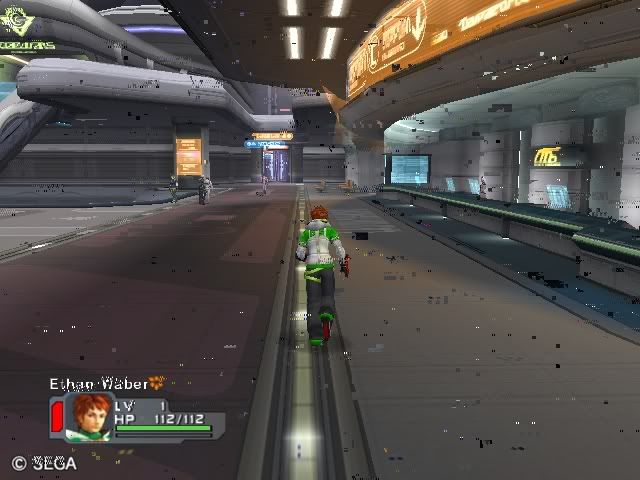
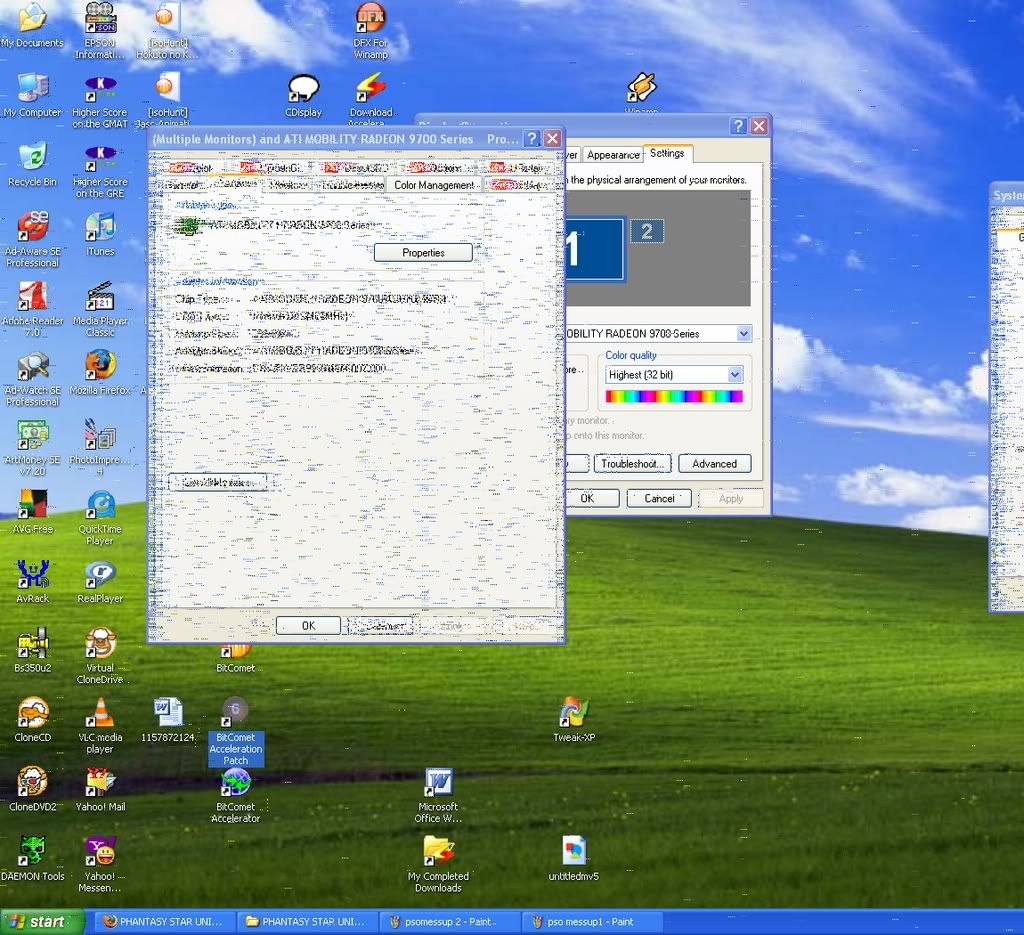
Looks like your video drivers are hosed....hopefully.
If after downloading and reinstalling the drivers you get the same effect, you need to look at replacing the lcd screen or the inverter.
I'm willing to bet your video drivers got corupted somehow though...
Last edited by shamus; November 10th, 2006 at 09:36 PM.
-
November 10th, 2006, 09:54 PM
#3
Yeah i've already tried that. I went here to download them
http://www.sagernotebook.com/pages/tech_sfwrdls.html#2 (NP8790)
The newest that they have is 2004.....yikes..... so i went to the official ati website to try to download theirs according to the 9700 series only to find out (after trying to install it) that my laptop isn't compatible with that 9700 series..... sooooo now im lost. I guess i might have to do that replacement
by the way, thanx for the quick response!!
-
November 11th, 2006, 01:20 AM
#4
Intel Mod

I'd think the fact that this only happens during gaming, and clears up with a re-boot pretty much eliminates the screen as a possibility, and the screenshot where the desktop corruption is quite different in appearance to the dialog suggests a memory/addressing problem of some kind.
I'd lean towards either driver corruption as already suggested, a video memory fault (less likely as re-booting cures it) or an incompatible setting that only the games use.
Since the laptop is a performance unit, it may have some more exotic BIOS settings like AGP Fastwrites and Sideband Addressing. These can cause problems at times, you could try disabling any such settings in the BIOS setup, and seeing if the corruption still occurs.
Also, does temperature seem to have anything to do with it? For example, if you start playing a game immediately on a cold startup, does the corruption still happen as soon as if you wait until the laptop gets warm then start a game?
Last edited by Platypus; November 11th, 2006 at 01:22 AM.
-
November 11th, 2006, 04:57 AM
#5
Driver Terrier

My money is on a hot video card... seen that effect before. What kind of surface do you put the laptop on when gaming?
-
November 11th, 2006, 05:42 AM
#6
Registered User

Looks like a heat issue to me, check and see if the fans are working, Maybe there is a setting in the bios to have the fans come on at a lower temp.
How warm does the bottom of the laptop get during a gaming session?
-
November 11th, 2006, 01:38 PM
#7
i kind of ran a test on it today. I played a game from a dead cold start up. What kind of surprised me was that it didn't glitch up at the part that it usual did but then soon enough it started to glitch up, and to top it off the system wasn't even hot (but it did take a while to glitch up as compared to before). It was cold-warm at the time of the glitch, but it was getting a little hotter though. I stopped after about 5-10 minutes or so and by the time i stopped my system was already screwed (needing the restart) and the laptop was warm (not hot).
by the way this time i was playing it on my lap in a way that made sure that nothing was interfering with the fan.....
-
November 11th, 2006, 03:27 PM
#8
Is your page file showing a negative number?
Have you vaccumed the vent holes?
-
November 11th, 2006, 05:17 PM
#9
naww i haven't vaccumed the vent holes nor do i know what a page file is. But would it be ok to use one of those desk top dusters (the one that you can spray)?
-
November 11th, 2006, 05:21 PM
#10
Driver Terrier
You want to vacuum, not blow...
Page file, right click on a blank bit of the task bar, now click task manager. The second graph is the page file. A page file is a special system file where windows stores to disk what it needs to... kinda like ram on a hard disk.
-
November 12th, 2006, 05:33 PM
#11
Registered User

I think the possible issues with overheating may be the leading contender, but games are often the buggiest software on the planet. I'd suggest going to the game's support site and downloading all current patches and updates. Also check to see if there any known problems with your system, particularly the video chip.
I don't recognize the screenshots (not surprising since I don't play that many games) but some games just don't run well under XP. As an example, Star Trek Orion Pirates played OK for me under Win98, but barely ran under W2K or XP even using Compatibility Mode and much experimentation on the settings. Some of the artifacts you're seeing look very similar to what I saw with this game. Things would start out fine, stay fine for some random period, the go south. I think perhaps your game may have a problem with XP.
-
November 12th, 2006, 11:38 PM
#12
this happend with any game that i played. I tested it with 3 different games, new and old....
-
November 13th, 2006, 10:06 PM
#13
Registered User

I have a lap top with a Targus pad that I use to keep things cool.
It is a flat panel with two fans that pull hot air out and send it out the end.
uses usb for power. so you can put it on the bed, or where ever you need to be without overheating. 
-
November 14th, 2006, 05:29 AM
#14
Registered User

-
November 14th, 2006, 09:07 PM
#15
Registered User
YES SIR it keeps my notebook cool and Me tooo
Similar Threads
-
By Smokey702a in forum BIOS/Motherboard Drivers
Replies: 9
Last Post: April 30th, 2001, 03:14 AM
-
By KevinPKT in forum Windows 95/98/98SE/ME
Replies: 3
Last Post: February 8th, 2001, 10:49 PM
-
By format c: in forum Windows 95/98/98SE/ME
Replies: 11
Last Post: January 31st, 2001, 02:02 AM
-
By Jared Job in forum Windows 95/98/98SE/ME
Replies: 20
Last Post: October 2nd, 2000, 05:39 PM
-
By stpeter in forum CD-ROM/CDR(-W)/DVD Drivers
Replies: 7
Last Post: July 5th, 2000, 04:18 PM
 Posting Permissions
- You may not post new threads
- You may not post replies
- You may not post attachments
- You may not edit your posts
-
Forum Rules
|
|











 Reply With Quote


 Originally Posted by xpuser357


Bookmarks